

eBranch Help
Simple Steps to View, Manage, and Move Your Money
Easy steps to access your account with eBranch (our online access system) and our mobile app.

We’ve Built a Powerful New Platform
We’re excited to announce our new digital banking experience is here! This new platform will make it easier to access your accounts, move your money, and manage your financial life.
What to Expect
While there will be a few steps required on your part, rest assured that we are doing the heavy lifting behind the scenes to make the upgrade as smooth as possible.
» First Login
A required password reset.
All eBranch users will be required to reset their existing password to activate the new platform. Get started from our homepage.
» Transfers
Move money between accounts with fewer steps both within CEFCU and your external accounts at other financial institutions. Plus, take advantage of 90 additional minutes every weekday to make external transfers with an extended cutoff time of 11:30 a.m. (Pacific).
» Mobile app
No app re-download needed.
Simply update to the latest version. This upgrade includes a new look to our app icon.
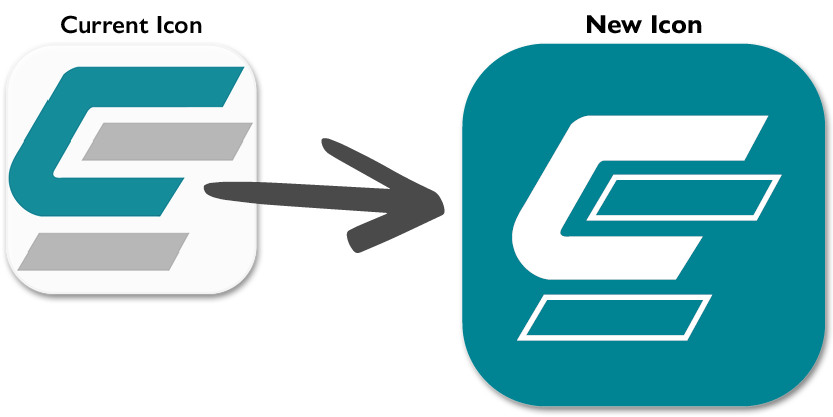
If your device is not set for automatic app updates or to download the app for the first time, visit your preferred app store.
 |
 |
|---|
A Quick Guide for Key Online Services
Easy steps to the most popular features within eBranch and our mobile app. |
|
|---|---|
 |
First-Time UserOnline access to your account from anywhere!
|
 |
AlertsSet and manage alerts for:
Choose alerts that best fit your needs with your preferred delivery option. |
 |
External TransfersMove Money Between Accounts |
 |
Mastercard AccessEasily manage your CEFCU Platinum Mastercard®.
|
 |
Mobile AppDownload the app. |
 |
Mobile Check DepositMake your next check deposit from anywhere! Log in on our mobile app, then tap “Check.” Follow the prompts to complete your deposit in just a few steps. |
eBranch Disclosures
 Additional Support
If you have questions about our eBranch or mobile app services, please contact Electronic Services at (800) 592-3328, option 3. Representatives are available Monday through Friday from 8:00 a.m. to 4:45 p.m. (PT).
Alerts: Please note some alerts are mandatory by CEFCU and cannot be changed. Availability may be affected by your mobile carrier’s coverage area. Alerts received as text messages on your mobile device may incur a charge from your service provider. This feature is not available on the mobile app.
Mobile carrier message and data rates may apply. You can also access your accounts from your web enabled device at www.cefcu.org.
Mobile App: Fingerprint or facial authentication available only on eligible devices. If your device is accessed by others, those additional users will have access to any app. We recommend limiting log in to your username and password instead of fingerprint or face recognition.
Mobile Check Deposits limited to maximum of $20,000 per day. Mobile Check Deposits made before 3 p.m. (Pacific) will be posted same business day. The first $275 of the deposit will be made available on the next Business Day with the remaining funds available the 2nd Business Day. Exceptions may apply. View our Mobile Deposit Capture Agreement for more details.
Apple, the Apple logo, iPhone, and iPad are trademarks of Apple Inc., registered in the U.S. and other countries. App Store is a service mark of Apple Inc., registered in the U.S. and other countries.
Android, Google Play and the Google Play logo are trademarks of Google LLC.
All loans subject to credit approval. Rates and terms are subject to change without notice. CEFCU is an Equal Housing Lender. NMLS #626590.
Federally insured by NCUA.